Lenovo ThinkPad Pro Docking Station (40AH) — Mechanical Side Dock with Dual DisplayPort & VGA
The ThinkPad Pro Docking Station type 40AH turns a compatible ThinkPad into a full desk setup in one downward click. Two DisplayPort outputs plus VGA drive dual external monitors, Gigabit Ethernet gives you a wired network, and five USB ports handle every peripheral on the desk. Backed by a 12-month Reboot IT warranty with free standard AU shipping. Note: the AC power adapter is not included — you will need a compatible Lenovo slim-tip adapter.
-
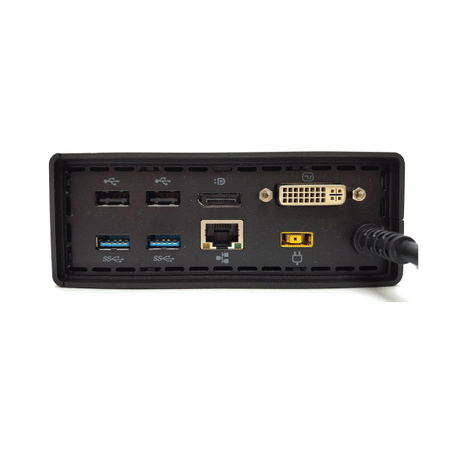
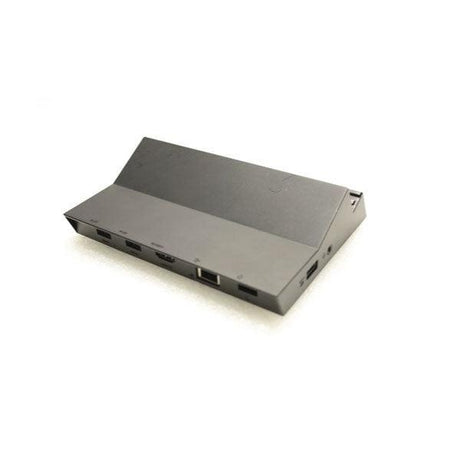
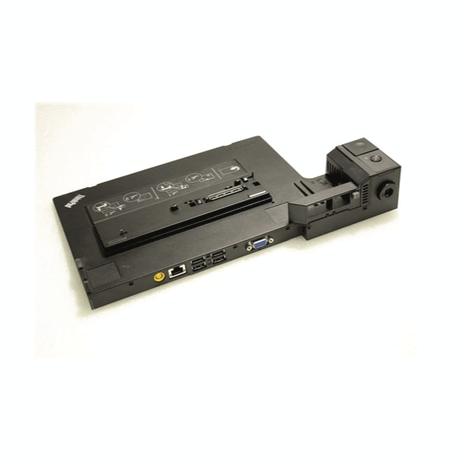
Dual DisplayPort Plus VGA: Two DisplayPort outputs run a modern dual-monitor pair, while the VGA port keeps older projectors, boardroom screens and legacy panels usable.
-
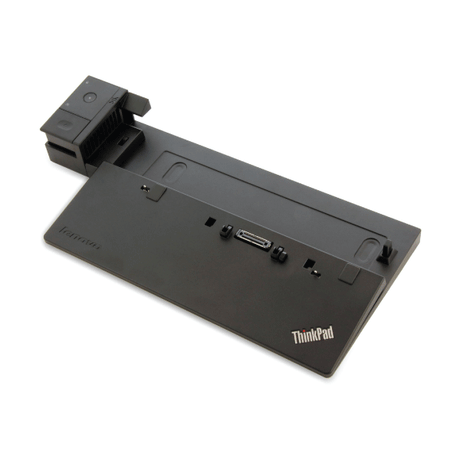
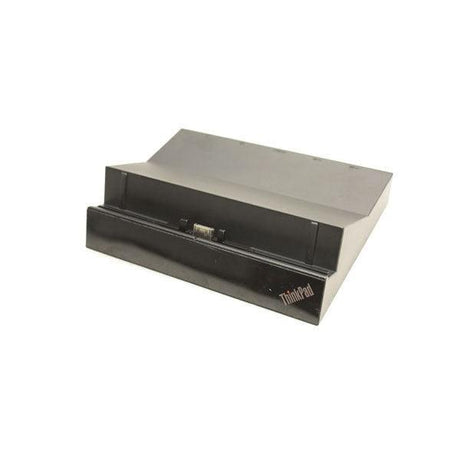
One-Click Mechanical Docking: The ThinkPad drops onto the side docking connector and locks — no cable to find, no USB-C handshake to fail, and a physical key lock to secure the laptop to the dock.
-
Five USB Ports: Three USB 3.0 ports for external drives, webcams and headsets, plus two USB 2.0 ports for keyboard and mouse — so nothing has to be unplugged to make room.
-
Gigabit Ethernet: A wired 10/100/1000 connection for video calls, large file transfers and cloud backups where office Wi-Fi gets congested.
-
Charges While Docked: With a compatible Lenovo slim-tip adapter connected, the dock powers the laptop as it sits, so it is at full charge when you unlock and go.
-
Built for Fleets: Kensington-style lock slot and a keyed dock release make this a practical choice for shared desks, hot-desking floors and managed corporate environments.
Performance in Use
This is the dock for an office still running a mixed monitor estate. Two DisplayPort outputs handle the current screens on the desk, and the VGA port covers the older projector in the meeting room or the legacy panel nobody has budget to replace yet. That combination is exactly why the Pro Dock stayed in service across so many corporate fleets — it bridges two generations of display hardware from one box.
Docking is mechanical rather than cabled. The laptop seats onto the side connector and clicks home, which means the connection is the same every time: no cable to hunt for behind the desk, no alt-mode negotiation to fail, and no wondering whether this particular port supports video. For a shared or hot-desk position that reliability matters more than it sounds — the dock either has the laptop or it does not, and staff can see which at a glance.
Around the back, three USB 3.0 ports take the external drive, webcam and USB headset, while two USB 2.0 ports carry the keyboard and mouse without consuming the faster lanes. Gigabit Ethernet handles the workloads that expose Wi-Fi congestion — long Teams calls, multi-gigabyte transfers, overnight backups. With a compatible slim-tip adapter attached, the laptop charges the whole time it sits on the dock.
Technical Specifications
| Specification |
Details |
| Model |
Lenovo ThinkPad Pro Docking Station (Type 40AH) |
| Host Connection |
ThinkPad mechanical side docking connector |
| Video Outputs |
2 × DisplayPort, 1 × VGA — dual external display support |
| USB Ports |
3 × USB 3.0, 2 × USB 2.0 |
| Network |
Gigabit Ethernet (10/100/1000) |
| Audio |
Stereo / microphone combo jack |
| Power Adapter |
Not included — requires a compatible Lenovo slim-tip AC adapter |
| Security |
Kensington-style lock slot, keyed dock release |
| Compatibility |
ThinkPad models with the mechanical side docking connector — T470, T480, T570, T580, X270, X280, L470, L480, L570, L580, P51s, P52s and similar |
| Warranty |
12 months (Reboot IT) |
Is It Right for You?
✓ Best For:
• ThinkPad T, X, L or P series with a side dock connector
• Offices running a mix of DisplayPort and VGA screens
• Hot-desk and shared-workstation setups
• Buyers who already own a Lenovo slim-tip adapter |
✗ Not For:
• USB-C or Thunderbolt docking — this is a mechanical dock
• ThinkPads without the side docking connector
• Non-Lenovo laptops of any brand
• Buyers needing a ready-to-run kit — no adapter supplied |
Condition Grades
| Grade |
Cosmetic Condition |
Functional Testing |
| A — Excellent |
Minimal marks, clean dock connector and ports |
All USB, video and network ports verified |
| B — Good |
Light wear, minor surface marks |
All USB, video and network ports verified |
Frequently Asked Questions
Is the power adapter included?
No. This dock is supplied without an AC adapter. You will need a compatible Lenovo slim-tip power adapter — typically 90W, or 135W for P series machines — which you may already have with the laptop.
Will this dock work with my USB-C ThinkPad?
Only if the laptop has the mechanical side docking connector. This is not a USB-C dock — it connects through the physical dock port on the left side of compatible ThinkPads, not through a cable. If your ThinkPad docks only via USB-C or Thunderbolt, you need a different model.
Which ThinkPads is it compatible with?
ThinkPad models carrying the side mechanical docking connector, including T470, T480, T570, T580, X270, X280, L470, L480, L570, L580, P51s and P52s. If you are unsure, check for the rectangular docking connector on the left-hand edge of your laptop.
How many external monitors can I run?
Two external displays simultaneously, using the DisplayPort and VGA outputs. Maximum resolution depends on your laptop's graphics and the display you connect.
Does it work with non-Lenovo laptops?
No. The mechanical dock connector is proprietary to compatible ThinkPad models, so HP, Dell and other brands are not supported.
What are the shipping options?
Free standard AU shipping is included on this dock from Reboot IT.
Warranty & After-Sales Support
Every Lenovo ThinkPad Pro Docking Station sold by Reboot IT includes a 12-month warranty covering hardware defects and connectivity failures. Free standard AU shipping included.
Reboot IT has been Australia's trusted refurbished IT specialist since 2001. Every dock is tested — all USB, video and network ports verified — before dispatch. Melbourne-based support at reboot-it.com.au.