Excellent
This unit
Excellent to very good cosmetic condition. Looks close to new from a normal viewing distance.
- Minor case marks or light scratches possible
- All ports and components fully tested
AustraIia’s trusted refurbished computers since 2001 – Extra 10% off Red Tag deals

Every refurbished unit is professionally tested in our Melbourne workshop and assigned a cosmetic grade. Functionally all units are covered by a 12-month warranty regardless of grade.
Excellent to very good cosmetic condition. Looks close to new from a normal viewing distance.
Good cosmetic condition with visible signs of prior use. Fully functional and tested.
You save $80
or 4 interest-free payments of $72.25 with Afterpay
Couldn't load pickup availability

Warranty
If your item experiences a technical issue, we've got you covered—we'll either repair it or replace it for you!
30 days to change your mind
Feel free to return your item for any reason within the first 30 days of receiving it. It's that easy!
Free express shipping
Enjoy fast, free express shipping on all small items like laptops, tablets, and smartphones!
Customer support
Rest assured, we’ll always respond to you within 1 business day!
What does the warranty cover?
Our warranty covers all hardware faults, but please note it doesn’t cover accidental damage or software issues. However, we’re here to help with technical support for those matters!
What is a refurbished device?
A refurbished device is a pre-owned item that has been restored to meet high-quality standards. At Reboot IT, we adhere to strict quality guidelines, ensuring that our refurbished products are not the same as used or secondhand items. We meticulously clean, test, and assess each device, replacing worn parts with high-quality components.
Unlike used items, which lack guarantees and rely solely on the seller's word regarding condition, refurbished devices come with assurance of quality and reliability.
What payment options are available?
We offer a variety of payment options to make your shopping experience as convenient as possible! You can pay using all major credit cards, Apple Pay, Google Pay, Shop Pay, Afterpay, Zip Pay, and PayPal. If you prefer, we also accept bank deposits and even cash for in-store purchases!

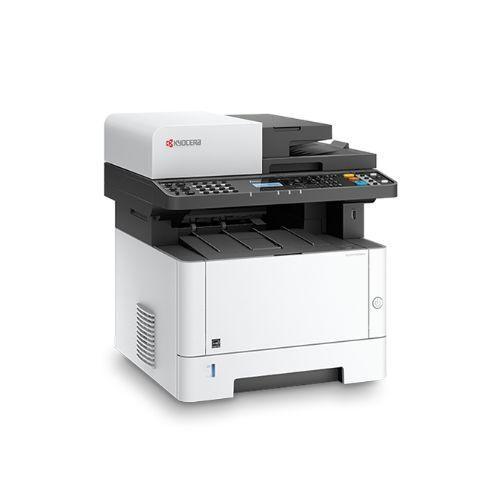
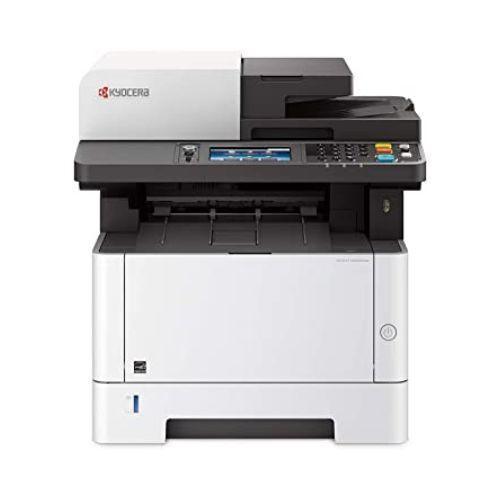
Kyocera ECOSYS M2540dn A4 Mono Laser MFP Printer Copy Scan Fax 40pp...
We ensure secure processing of your payment information and do not retain or have access to your credit card details.
A workgroup-class A4 mono laser MFP that prints, copies, scans in colour and faxes — 40 pages per minute, automatic duplex, and a dual-scan feeder that captures both sides of a page in a single pass. Network-ready over Ethernet and covered by a 12-month Reboot IT warranty.
The M2540dn sits in the sweet spot for a small-to-medium team: fast enough that nobody queues, cheap enough per page that finance stops asking about it, and compact enough to live on a bench rather than needing its own corner. At 40 ppm mono with duplex as standard, a 60-page double-sided report is a job you start and walk away from. The 350-sheet standard capacity — a 250-sheet cassette plus a 100-sheet multipurpose tray — means letterhead or labels can live in the bypass without disturbing the main stack.
The dual-scan feeder is the feature people notice most day to day. Single-pass duplex scanning means a stack of double-sided contracts, invoices or forms goes through once at full speed instead of being flipped and re-fed. Combined with colour scanning and scan-to-email or scan-to-folder, it turns the machine into the digitising point for a small office rather than just a printer that happens to copy.
Where it fits: accounts and admin teams pushing paper volume, professional practices scanning client files, schools and community organisations, or any office replacing a tired inkjet all-in-one with something built for a duty cycle rather than a home desk. Where it does not fit: colour printing — this is a mono device, and colour appears only on scans, never on output. If you need colour pages, this is the wrong machine.
| Model | Kyocera ECOSYS M2540dn |
| Type | A4 mono laser multifunction (print, copy, scan, fax) |
| Print Speed | Up to 40 ppm A4 mono |
| Print Resolution | 600 dpi, up to 1,200 dpi fine mode |
| Duplex | Automatic two-sided print and copy |
| Document Feeder | Dual scan document processor, single-pass duplex, A6 originals supported |
| Scanning | Colour scanning (output is mono only) |
| Paper Capacity | 350 sheets standard (250-sheet cassette + 100-sheet multipurpose); expandable to 850 with optional feeders |
| Connectivity | Ethernet (RJ-45) and USB 2.0 |
| Dimensions | 475 x 412 x 437 mm (W x D x H) |
| Weight | Approximately 19–20 kg |
| Page Count (this unit) | 186,733 pages |
| Toner Remaining | Approximately 5% — budget for a replacement toner kit |
| Warranty | 12 months, supplied by Reboot IT |
|
✓ Best For
|
✗ Not For
|
| Grade A — Excellent | Minimal signs of previous use. Panels, trays and covers carry only superficial marks, and the control panel and display are clear and undamaged. |
| Grade B — Good | More visible cosmetic wear — scuffs, light scratches or discolouration to the casing and trays from normal office life. Fully functional throughout. |
Every machine is function-tested before dispatch across printing, copying, colour scanning, the document feeder, duplex operation and network connectivity.
Does it print in colour?
No. The M2540dn is a mono (black and white) laser printer. It scans in colour, so you can email or file a colour scan, but everything it puts on paper is black and white.
How much toner is left, and what do I need to buy?
This unit reports approximately 5% toner remaining, so plan on a replacement kit early. The M2540dn uses a standard Kyocera TK-series black toner kit — please confirm the current part number for the Australian model with your supplier before ordering, as regional part numbers differ.
Is a page count of 186,733 high?
It is mid-life for a workgroup machine of this class rather than end-of-life — these are built for sustained monthly volume, and the ECOSYS design keeps the long-life drum separate from the toner. We state the figure openly so you can judge it yourself, and the unit is covered by our 12-month warranty regardless.
Does it have Wi-Fi?
No. Network connection is by wired Ethernet (RJ-45), with USB 2.0 for a direct connection to a single computer. Plugging it into your router or switch makes it available to everyone on the network.
Can it scan both sides of a page automatically?
Yes. The dual scan document processor reads both sides in a single pass, so double-sided originals go through the feeder once at full speed. It handles originals down to A6.
What is included?
The printer and a tax invoice. Toner is whatever remains in the machine (approximately 5%). If you need a power lead, network cable or additional paper trays, mention it with your order.
How is it shipped?
This is a heavy item at around 19–20 kg, so shipping costs apply based on size and destination — rates are calculated at checkout. It is packed and dispatched from our Melbourne warehouse with tracking emailed to you. Local pickup is available if you would rather collect.
This printer is covered by a 12-month Reboot IT warranty. If a covered fault appears within that period we will repair or replace the machine, and you deal with our team directly rather than an overseas call centre. Consumables — toner in particular — are excluded, as they are on any printer.
Reboot IT has been refurbishing business IT in Melbourne since 2001. Every multifunction device is powered up and put through its full range before listing: print quality, copy, colour scan, the document feeder and duplex path, fax, network connectivity, tray operation and the control panel. Page counts and toner levels are read off the machine and stated as found, not estimated.
Buying refurbished keeps serviceable business hardware out of landfill and puts a workgroup-class machine on your floor for a fraction of the cost of new. This listing is backed by our 12-month warranty and your rights under Australian Consumer Law.
40ppm With Auto Duplex
Prints up to 40 A4 pages per minute with automatic two-sided output as standard, cutting paper use close to half on long documents.
Shared Over The Network
Ethernet and USB 2.0 let the whole workgroup print, copy and scan to it without leaving a host computer switched on.
Single-Pass Duplex Scanning
The dual scan document processor captures both sides of a page in one pass, roughly halving the time on double-sided scanning jobs.
12 Month Warranty
Function-tested across print, copy, colour scan, feeder, duplex and network by Reboot IT, then backed by a full 12-month warranty.
40ppm With Auto Duplex
Prints up to 40 A4 pages per minute with automatic two-sided output as standard, cutting paper use close to half on long documents.
Shared Over The Network
Ethernet and USB 2.0 let the whole workgroup print, copy and scan to it without leaving a host computer switched on.
Single-Pass Duplex Scanning
The dual scan document processor captures both sides of a page in one pass, roughly halving the time on double-sided scanning jobs.
12 Month Warranty
Function-tested across print, copy, colour scan, feeder, duplex and network by Reboot IT, then backed by a full 12-month warranty.
16 Aug
Order placed
18 Aug - 19 Aug
Dispatched
21 Aug - 26 Aug
Get it by
Excellent
Excellent condition, promptvdelivery and easy and secure payment.
Product is exactly as described, would have no problem buying again
I like and very nice clean
Very easy fit
Great upgrade phone at a very reasonable price.
Condition as stated in description if not better.
Great little laptop for school
Good value and great quality
Fantastic service
I was looking for an in-expensive all-in-one solution for my home office to replace my existing desktop and monitor. I found this EliteOne 800 on reboot IT for under $200. I wasn't sure what to expect. It arrived within two days!!!! I upgraded the RAM, replaced the HDD and installed Windows 11. This is unbeatable value and was the cheapest price online. Coupled with a 3-month warranty, Reboot IT are by far the best online refurbished retailer I have used. Awesome!
Great service. Product in great condition and exactly what i want. I wanted this for a specific purpose but i dont need to spend $900 on a new one.
Excellent work
exactly as described and works well , just like the staff down there. 10/10
Very happy, thank you
Just having trouble greeting it linked to the internet otherwise it’s okay.
Kyocera
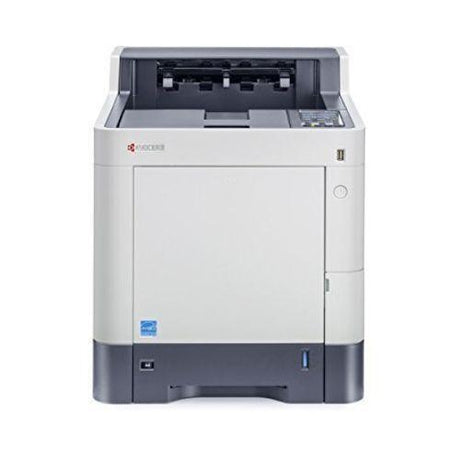
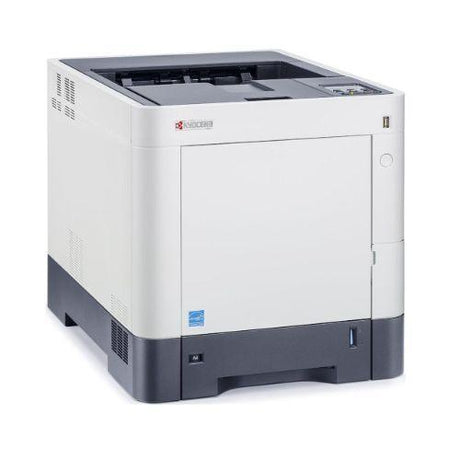
Kyocera ECOSYS P3050DN Mono A4 Laser Printer 29032 Page Count | 3mth Wty


Ricoh
Ricoh Aficio SP 5200DN Monochrome Laser Printer | 47ppm Duplex Network


Brother
Brother FAX-2840 Mono Laser Fax Machine Plain Paper Printer Office | Wty

Custom
CUSTOM TK302 Thermal Printer Ethernet USB RS232 Interface | Wty

Custom
CUSTOM TK300II Thermal Ticket Printer 20-82.5mm Adjustable Width | Wty


Dell
Dell Latitude 5440 14" FHD i7-1365U 13th Gen 16GB 512GB NVMe SSD Win 11 Pro Wty
Dell
Dell Latitude 5440 i5-1345U 8GB 256GB SSD 14" FHD 4G LTE Win 11 Pro Business Wty


HP
HP Compaq Elite 8300 Desktop PC i5-3470 2GB DVDRW No HDD No OS Barebones | Wty


Apple
Apple MacBook Pro 13" 2020 i7-1068NG7 32GB 512GB SSD Retina Touch Bar macOS Wty


Dell
Dell E2220H 21.5" FHD 1920x1080 LED Business Monitor VGA DisplayPort VESA Wty No Stand


Cisco
Cisco 1712 Router VPN Firewall 1x WAN 2x LAN IOS Enterprise Business Wty


HP
HP ProLiant DL380 G5 2U Rack Server 2x Xeon X5460 28GB No HDD Enterprise | Wty


HP
HP 2210 Monitor 22" FHD No Stand 1920x1080 VESA Mount Business Office Wty

We carefully source certified refurbished computers from trusted corporate, government, and education sectors, giving each device a fresh start and new purpose.

To protect your privacy, all previous data is securely and thoroughly erased from every tested refurbished device before it reaches you.

Each certified refurbished computer undergoes detailed testing with specialized software to ensure full functionality, and any worn or faulty components are replaced exclusively with original parts, guaranteeing reliable, long-lasting performance for your tested refurbished device.

Every computer is professionally cleaned and carefully graded, so you know exactly what condition your certified refurbished computer is in—giving you full confidence in your purchase.
Since 2001, Reboot IT has been Australia’s trusted source for certified refurbished computers and IT hardware. Every device is rigorously tested and professionally refurbished to deliver reliable, like-new performance — all at a fraction of the cost of new equipment. With over 100,000 satisfied customers, we combine expert quality with unbeatable value. Shop with confidence knowing your refurbished device comes backed by warranty and supports sustainable tech reuse.


Visit our support center
Expert help & advice

Check your order status
Updates and tracking

Returns & exchanges
All you need to know

Price match guarantee
Our promise to you
Processor
Storage
Storage Type
Memory
Screen Size
Operating System




