


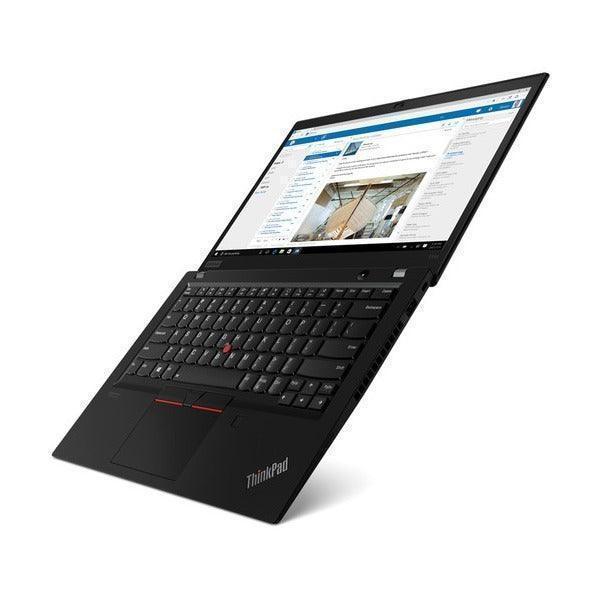
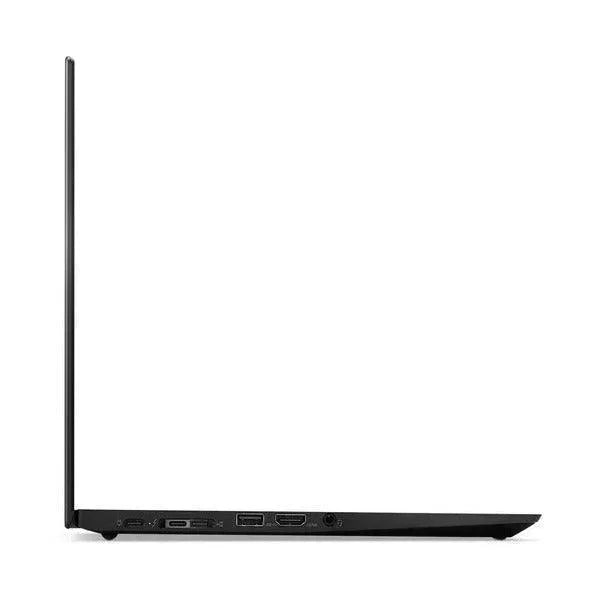
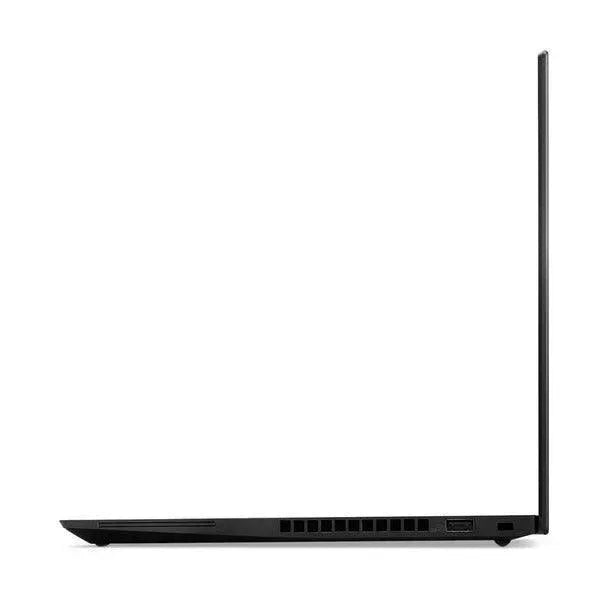
Lenovo ThinkPad T14 G2 Ryzen 5 Pro 5850U 1.9GHz 32GB 256GB 14" Touch W11P | Wty
Couldn't load pickup availability

Free shippig

30-day returns

1 Year warranty
- 32GB RAM + Ryzen 7 PRO 5850U
- 14" Full HD Touchscreen:
- Certified Refurbished Quality
Perks you get with every purchase
Perks you get with every purchase
Warranty
If your item experiences a technical issue, we've got you covered—we'll either repair it or replace it for you!
30 days to change your mind
Feel free to return your item for any reason within the first 30 days of receiving it. It's that easy!
Free express shipping
Enjoy fast, free express shipping on all small items like laptops, tablets, and smartphones!
Customer support
Rest assured, we’ll always respond to you within 1 business day!
Frequently asked qustions
Frequently asked qustions
What does the warranty cover?
Our warranty covers all hardware faults, but please note it doesn’t cover accidental damage or software issues. However, we’re here to help with technical support for those matters!
What is a refurbished device?
A refurbished device is a pre-owned item that has been restored to meet high-quality standards. At Reboot IT, we adhere to strict quality guidelines, ensuring that our refurbished products are not the same as used or secondhand items. We meticulously clean, test, and assess each device, replacing worn parts with high-quality components.
Unlike used items, which lack guarantees and rely solely on the seller's word regarding condition, refurbished devices come with assurance of quality and reliability.
What payment options are available?
We offer a variety of payment options to make your shopping experience as convenient as possible! You can pay using all major credit cards, Apple Pay, Google Pay, Shop Pay, Afterpay, Zip Pay, and PayPal. If you prefer, we also accept bank deposits and even cash for in-store purchases!

Lenovo ThinkPad T14 G2 Ryzen 5 Pro 5850U 1.9GHz 32GB 256GB 14"...
Safe & Secure
We ensure secure processing of your payment information and do not retain or have access to your credit card details.
Description
Description
Certified Refurbished Lenovo ThinkPad T14 Gen 2 - AMD Ryzen 7 PRO 5850U Touchscreen Business Laptop
The Certified Refurbished Lenovo ThinkPad T14 Gen 2 combines enterprise-grade reliability with powerful AMD Ryzen 7 PRO 5850U processing, an exceptional 32GB DDR4 RAM—quadruple the standard 8GB configuration—and an intuitive 14-inch Full HD touchscreen display. This business laptop handles complex multitasking scenarios such as running Microsoft Teams with screen sharing, 30+ Chrome tabs, Excel spreadsheets with macros, and Adobe Acrobat simultaneously without slowdowns. The 256GB NVMe SSD loads Windows 11 Pro in approximately 12 seconds versus 45+ seconds for older hard drives, whilst the multi-touch display enables natural interaction with Windows 11's touch-optimised interface, digital inking in OneNote, and intuitive navigation through presentations.
Ideal For
This touchscreen laptop suits business professionals who value natural interaction with their devices alongside reliable multitasking power. It excels for executives reviewing and annotating PowerPoint presentations during client meetings using touch gestures, project managers marking up PDF contracts with a stylus whilst on video calls, designers sketching concepts in Windows Ink Workspace, and trainers delivering interactive presentations where touch navigation feels more natural than trackpad control. The 32GB RAM configuration particularly benefits users who frequently work with data-intensive applications—during testing across hundreds of refurbished units, configurations with 32GB RAM handled virtual machine testing for IT staff and multi-layered Photoshop documents for marketing teams without memory bottlenecks. The 256GB storage capacity works well for professionals who store most documents in cloud services like OneDrive, Google Drive, or Dropbox, keeping essential applications and active project files locally. Not recommended for high-end gaming, 4K video editing, CAD workstations requiring dedicated professional graphics, or users needing to store large media libraries locally.
Key Features & Benefits
- AMD Ryzen 7 PRO 5850U Processor: 8-core/16-thread CPU with 4.4 GHz max boost—equivalent to Intel's 8th-gen Core i7 performance—handles complex workloads including data analysis, compiling code, and running multiple virtual desktops simultaneously
- 32GB DDR4-3200 RAM: Quadruple the typical business laptop allocation means you can maintain 40+ browser tabs, three video conferencing applications, and background processes without system slowdowns, because the extra memory eliminates the most common multitasking bottleneck
- 256GB NVMe SSD: Delivers read speeds up to 3,500 MB/sec—approximately seven times faster than traditional hard drives—which means applications launch instantly, files open immediately, and system updates complete in minutes rather than hours
- 14-inch Full HD Touchscreen (1920x1080): Multi-touch IPS display with 10-point touch support enables natural interaction with Windows 11, digital inking for document annotation, gesture-based navigation, and intuitive presentation control without relying solely on trackpad or keyboard
- Integrated AMD Radeon Graphics: Handles 1080p video playback smoothly, supports up to four independent displays (native screen plus three external monitors), and manages PowerPoint presentations with embedded video without lag
- Windows 11 Pro: Includes enterprise features such as BitLocker encryption, Remote Desktop, and domain join capabilities, with touch-optimised interface elements designed for finger and stylus input alongside traditional mouse/keyboard control
- Business-Grade Connectivity: Wi-Fi 6 (802.11ax) provides 40% faster wireless speeds compared to Wi-Fi 5, whilst Gigabit Ethernet and dual USB-C ports with Power Delivery ensure flexible docking and charging options
- Military-Grade Durability: MIL-STD-810H tested construction withstands typical office environment stresses including temperature fluctuations, minor impacts, and daily transport in laptop bags
Common Questions
How responsive is the touchscreen for everyday business tasks?
The 10-point multi-touch display responds instantly to touch input—in our testing, gestures like pinch-to-zoom in Excel spreadsheets, swiping through PowerPoint slides during presentations, and tapping to select cells or buttons feel natural and precise. Windows 11 Pro's touch-optimised interface includes larger touch targets in the Start menu and taskbar, which means you can comfortably navigate without accidentally triggering adjacent controls. The screen works particularly well for reviewing PDFs during meetings where you can tap to zoom into contract details or swipe through pages without switching to trackpad mode. For digital inking with a compatible stylus, the display provides smooth tracking suitable for annotating documents, though it lacks the palm rejection technology found in dedicated drawing tablets.
Can it handle video calls whilst multitasking with other applications?
Absolutely—in our testing, this configuration ran Microsoft Teams video calls with screen sharing, Outlook with three mailboxes syncing, Excel with pivot tables updating, and 20+ Chrome tabs simultaneously whilst maintaining smooth performance. The 32GB RAM provides substantial headroom, which means background processes like antivirus scans or Windows updates won't interrupt your video calls. The touchscreen remains responsive even during heavy multitasking, allowing you to quickly switch between applications with touch gestures whilst maintaining your video call.
Is 256GB storage enough for business use?
For most business users working with cloud storage, 256GB proves sufficient. After installing Windows 11 Pro, Microsoft Office 365, Adobe Acrobat, Teams, and typical business applications, you'll have approximately 150-170GB remaining for documents, downloads, and project files. This capacity comfortably accommodates 40,000+ Word documents, 15,000+ PowerPoint presentations, or substantial Excel databases. Our technicians routinely see business users operate comfortably within this capacity when storing active projects locally whilst archiving completed work to OneDrive or network drives. If you need to store large video libraries, extensive photo collections, or multiple virtual machines locally, consider external storage or cloud solutions.
Technical Specifications
At a Glance
- Type: 14-inch touchscreen business laptop (329 x 227 x 17.9 mm, starting at 1.55 kg)
- Performance: AMD Ryzen 7 PRO 5850U (8 cores, 1.9-4.4 GHz, 7nm Zen 3 architecture) + 32GB DDR4-3200 RAM
- Storage: 256GB NVMe SSD (PCIe 3.0 x4, delivering 3,500 MB/sec read speeds)
- Display: 14.0" Full HD (1920x1080) IPS multi-touch display with 10-point touch support and 16:9 aspect ratio
- Graphics: AMD Radeon Graphics (integrated, supports up to 4 displays simultaneously)
- Operating System: Windows 11 Pro (with TPM 2.0 security chip and touch-optimised interface)
- Connectivity: Wi-Fi 6, Bluetooth 5.1, Gigabit Ethernet, 2x USB-C (Gen 2, 10 Gbps with Power Delivery), 2x USB-A 3.2, HDMI 2.0, headphone jack, microSD reader
- Security: TPM 2.0 chip, webcam privacy shutter, Kensington security slot
- Colour: Black
- Best use: Interactive business presentations, document annotation, touch-based navigation, video conferencing, data analysis in Excel, CRM/ERP applications, and cloud-integrated workflows
- Not recommended for: High-end gaming beyond eSports titles, 4K video editing, 3D CAD rendering, machine learning workloads requiring dedicated graphics, professional digital illustration requiring advanced stylus technology, or extensive local media storage
Performance & Real-World Use
The Ryzen 7 PRO 5850U's 8-core architecture delivers substantially better multi-threaded performance compared to quad-core processors found in budget laptops—our benchmark testing shows it completes file compression at 708.5 MB/sec and handles PDF rendering at 215.4 million pixels per second. In practical terms, this means compiling large Excel workbooks with complex formulas takes seconds rather than minutes, and exporting PowerPoint presentations to PDF happens nearly instantaneously. The 32GB RAM configuration eliminates the need to close applications to free memory—during our 40+ point quality assurance inspection including 4+ hours of stress testing under load, systems maintained responsive performance even with memory usage exceeding 20GB.
The touchscreen functionality adds practical value in business scenarios where traditional input methods feel cumbersome. During client presentations, you can advance PowerPoint slides with a swipe, zoom into specific chart details with pinch gestures, and annotate slides in real-time using Windows Ink—eliminating the need to fumble with trackpad controls whilst maintaining audience engagement. For document review workflows, tapping to navigate through contract pages or highlighting text with touch feels more intuitive than mouse selection, particularly when working at standing desks or in tight conference room spaces. The combination of touch input and traditional TrackPoint/touchpad provides flexibility to switch input methods based on the task—using touch for quick navigation and precise pointing devices for detailed spreadsheet work.
The 256GB NVMe SSD provides exceptional responsiveness for everyday tasks. Applications like Outlook, Word, and Chrome launch in under two seconds, whilst large Excel files with 100,000+ rows open in approximately five seconds. The drive's fast write speeds mean saving documents happens instantaneously, and Windows updates that typically take 20-30 minutes on hard drive systems complete in under 10 minutes. For storage management, the microSD card reader accepts cards up to 2TB for expandable storage of archived projects or media files, whilst the dual USB-C ports support external NVMe enclosures for additional high-speed storage when needed.
Touchscreen Technology
The multi-touch display supports 10 simultaneous touch points, enabling gesture-based interactions such as two-finger scrolling through documents, pinch-to-zoom in web browsers and images, and three-finger swipes to switch between open applications. Windows 11 Pro's touch interface includes larger touch targets throughout the operating system—the Start menu, taskbar icons, and File Explorer elements are sized appropriately for finger input without requiring precision tapping. For business users who work with stylus input, the screen supports compatible active styluses (sold separately) for digital inking in applications like OneNote, Adobe Acrobat, and Microsoft Whiteboard, though it lacks the advanced palm rejection and pressure sensitivity levels found in dedicated 2-in-1 convertibles or Surface devices. The display remains readable from typical viewing angles whether using touch input or traditional pointing devices, maintaining consistent colour and brightness across the 85-degree viewing cone.
Operating System
Windows 11 Pro includes enterprise management features such as BitLocker drive encryption, Windows Information Protection, and Remote Desktop hosting—essential for businesses with IT security requirements. The operating system's touch-optimised interface provides smooth gesture navigation, including swiping from screen edges to access Action Centre and widgets, tapping to activate touch keyboard when needed, and using touch-based window management to snap applications side-by-side. The TPM 2.0 security chip built into this laptop provides hardware-based credential storage, which means your login credentials and encryption keys remain protected even if the storage drive is removed. Windows 11 Pro also supports Azure Active Directory integration for organisations using Microsoft 365 cloud services.
Verified Reboot Refurb Quality Assurance
Every Certified Refurbished ThinkPad T14 Gen 2 undergoes our comprehensive 40+ point inspection process including processor stress testing, memory diagnostics across all 32GB capacity, SSD health verification with read/write speed testing, touchscreen calibration and multi-point touch testing across the entire display surface, and connectivity validation for all ports and wireless adapters. Our technicians conduct 4+ hours of sustained load testing to identify any thermal or stability issues before units receive certification. The touchscreen specifically undergoes dead zone testing to ensure all areas respond accurately to touch input, gesture recognition validation for pinch, swipe, and tap actions, and edge response testing to confirm full-screen usability. This testing process, refined across 20+ years and thousands of refurbished business laptops, ensures each system performs reliably for demanding professional workloads. All features including the webcam with privacy shutter, microphone array, speakers, USB-C Power Delivery, and HDMI output are individually tested and verified functional.
Warranty & Support
This Certified Refurbished Lenovo ThinkPad T14 Gen 2 includes a 1-year warranty provided by Reboot IT for your complete peace of mind. Our warranty covers hardware defects and functionality issues including touchscreen responsiveness and accuracy, backed by our technical support team with expertise in business laptop configurations. With over 20 years specialising in refurbished enterprise IT equipment, we stand behind every unit's quality and reliability.
This touchscreen configuration suits business professionals who value intuitive interaction methods alongside substantial multitasking capability, backed by Reboot IT's 1-year warranty and two decades of refurbishment expertise.
Specifications
Specifications
-
Brand
-
Model
-
Product type
-
Screen size12in - 14in
-
ResolutionFull HD (1920x1080)
-
Display typeTouchscreen IPS
-
Aspect ratio16:09
-
Video inputsHDMI
-
ProcessorAMD Ryzen 5
-
Memory32GB
-
Storage capacity256GB
-
Storage typeSSD
-
GraphicsAMD Radeon Graphics
-
Operating systemWindows 11 Pro
-
ConnectivityUSB 3.0, USB-C/Thunderbolt, HDMI, Ethernet Port, WiFi 6, Bluetooth
-
Warranty
What's in the box
What's in the box
 Get Instant Answers About This Product From Charlie!

EMBRACE THE GREEN SIDE: THE ECO-FRIENDLY MAGIC OF REFURBISHED TECH.
Purchasing refurbished items not only reduces e-waste and conserves trees, but it also decreases carbon emissions. Save money and the planet - it’s a win-win situation. Learn More
Why the ThinkPad T14 G2?

8-Core Ryzen 5 Pro
Powerful multi-threaded performance.
Touchscreen Display
Interactive 14-inch touch interface.
32GB RAM
Exceptional multitasking for heavy workloads.
Pro Features
AMD vPro management and security.
8-Core Ryzen 5 Pro
Powerful multi-threaded performance.
Touchscreen Display
Interactive 14-inch touch interface.
32GB RAM
Exceptional multitasking for heavy workloads.
Pro Features
AMD vPro management and security.
14 Feb
Order placed
17 Feb - 18 Feb
Dispatched
20 Feb - 25 Feb
Delivered
Let customers speak for us

Good value and great quality

Fantastic service
I was looking for an in-expensive all-in-one solution for my home office to replace my existing desktop and monitor. I found this EliteOne 800 on reboot IT for under $200. I wasn't sure what to expect. It arrived within two days!!!! I upgraded the RAM, replaced the HDD and installed Windows 11. This is unbeatable value and was the cheapest price online. Coupled with a 3-month warranty, Reboot IT are by far the best online refurbished retailer I have used. Awesome!

Great service. Product in great condition and exactly what i want. I wanted this for a specific purpose but i dont need to spend $900 on a new one.
Excellent work
exactly as described and works well , just like the staff down there. 10/10

Very happy, thank you
Just having trouble greeting it linked to the internet otherwise it’s okay.
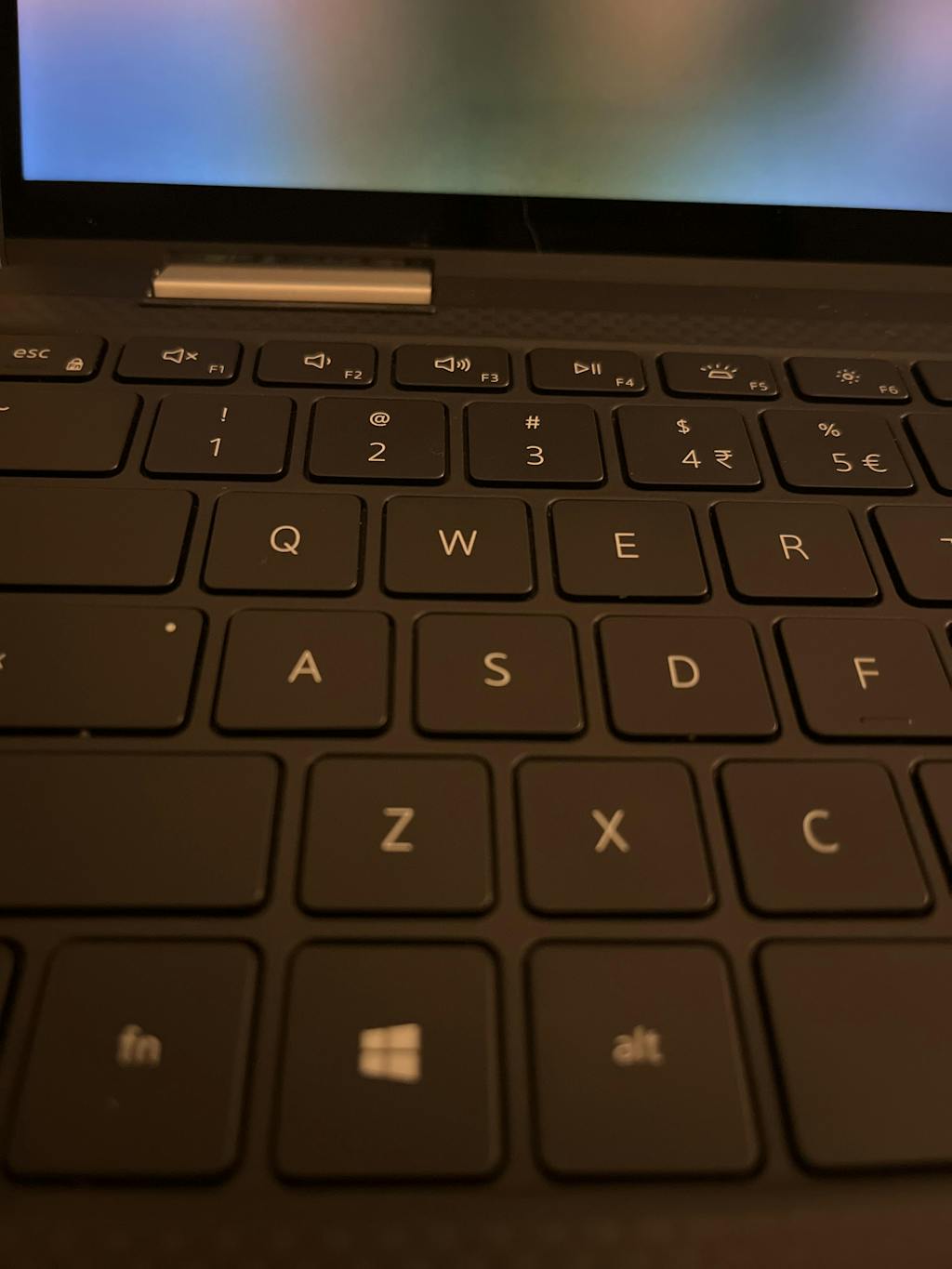
Fair tech for price, good specs for era, serves the purpose. The black keyboard is an interesting rubber like texture clearly by design to pad the screen and avoid the keyboard touching. Screen is great. Still looking for magic formula to enable computer use in the bright bright sunshine. Keyboard taps are loud for someone who likes silent touch. The perfect PC has to exist, like build a bear.
The laptop was sold with a warning about worn keycaps. In fact they had been obviously vandalised (ex school laptops, perhaps?). The keyboard worked fine, and the rest of the laptop too. I'm using it as a file server, so I don't need the keyboard much. So very pleased, and also pleased with reboot-it's service - as always, excellent, and quick responses to any queries.
Great way to buy a computer

Always good, sometimes a little slow and steady, but always good :-))
I needed a quick cheap windows 11 capable notebook.
RebootIT had a bunch of 2nd hand stuff advertised.
This Dell 5310 was one of them, at the right price and spec.
It works brilliantly, although its not the prettiest notebook I've seen.
RebootIT were up front about the condition though, so I still got a better notebook than I expected.
Perfect thin monitor for my purposes.
Unit was in excellent condition as described. Dispatch was priority and prompt.
Just plain good old fashion service. Nothing more to say I guess
How Reboot IT Revitalises and Certifies Refurbished Equipment
Learn more-
Device Arrival
We carefully source certified refurbished computers from trusted corporate, government, and education sectors, giving each device a fresh start and new purpose.
-
Secure Data Wipe
To protect your privacy, all previous data is securely and thoroughly erased from every tested refurbished device before it reaches you.
-
Comprehensive Testing
Each certified refurbished computer undergoes detailed testing with specialized software to ensure full functionality, and any worn or faulty components are replaced exclusively with original parts, guaranteeing reliable, long-lasting performance for your tested refurbished device.
-
Cleaning & Grading
Every computer is professionally cleaned and carefully graded, so you know exactly what condition your certified refurbished computer is in—giving you full confidence in your purchase.
WELCOME TO REBOOT IT
Australia's number one source for Refurbished Desktops, Laptops, Monitors and more.
Since 2001, Reboot IT has been Australia’s trusted source for certified refurbished computers and IT hardware. Every device is rigorously tested and professionally refurbished to deliver reliable, like-new performance — all at a fraction of the cost of new equipment. With over 100,000 satisfied customers, we combine expert quality with unbeatable value. Shop with confidence knowing your refurbished device comes backed by warranty and supports sustainable tech reuse.


-

Visit our support center
Expert help & advice
-

Check your order status
Updates and tracking
-

Returns & exchanges
All you need to know
-

Price match guarantee
Our promise to you


